

Hey, everyone! I wanted to share a cool project I’ve been working on for a few months.
JoyShockLibrary4Unreal is a plug-in that lets anyone add native support for DualShock 4, DualSense, Joy-Cons and Switch Pro controllers to their Unreal games on PC, including gyro support. It was built on top of the open-source project JoyShockLibrary by JibbSmart, and integrates into Unreal’s input event system. You can get the source code and read the setup instructions on its GitHub repo: https://github.com/AgentOttsel/JoyShockLibrary4Unreal
Here’s a quick demonstration of it being used to control a telekinesis ability through gyro aiming.
Now that I’ve shown a demonstration, I wanted to ramble a bit about what made me start working on this project and how the development has been so far.
If you’ve ever used a PlayStation or Switch controller to play games on PC, you know that it’s not a plug-and-play experience like it is with an Xbox controller. Windows is owned by Microsoft, after all, and they made XInput the standard input method for its games. However, there has been a great effort by Steam and other third-party tools such as DS4Windows to let players convert inputs from any modern controller to the XInput format, making them work with any game, and with plenty of customization options, too! Those are excellent tools, but also come with some limitations due to their non-native nature:
- While players can map Gyro to Mouse, game developers don’t get access to the full gyro data (which includes orientation and acceleration), meaning they can’t come up with creative ways to use it that go beyond emulating a mouse. Additionally, developers don’t get the ability to toggle gyro on and off when it makes sense (once again relying on players to add a modifier key to their settings, which might not make sense in every context);
- Relying on third-party tools adds an extra barrier of entry to those controllers’ exclusive features, meaning that players are less likely to try them. I believe that many players who became fans of gyro aiming discovered the feature organically while playing games that have gyro enabled by default, such as Gravity Rush, Zelda Breath of the Wild, Dreams, Splatoon or GOTY 2024 winner Astro Bot. If those players had had to go out of their way to enable gyro, most of them probably would’ve never tried the feature and found out what a game-changer it is when used properly.
I definitely felt some of those frustrations while working on my own personal projects. I wanted to add gyro-assisted flight controls to Crow Down Showdown, to support every modern controller without asking players to have other apps running in the background, and to improve my 3D Bash mechanic with gyro aiming. But not having native support for those controllers in Unreal meant that I couldn’t fully realize those ideas. I would need to start my own game studio and become a licensed PlayStation and Nintendo developer if I wanted to use their controller libraries in my own projects. And while that’s something that I would love to do someday, I wondered if there was an alternative solution that independent developers like myself could use right away.
Luckily, I found JoyShockLibrary, an open-source project created by input specialist JibbSmart. Thanks to a lot of reverse engineering work, this library allows communication with PlayStation and Switch controllers through both USB and Bluetooth. It is engine-agnostic, meaning you can add it as a DLL and a C++ header to any game. Not only that, but it also comes with JibbSmart’s other library, GamepadMotionHelpers, which adds calibration, gravity detection, player-space controls and other useful functionalities based on the raw gyro data acquired from a controller. The amount of work that has gone behind the original JoyShockLibrary by JibbSmart and other members of the game dev community cannot be understated, and I am very thankful to everyone who made it happen.
The process of adding JoyShockLibrary to Unreal started simple enough. I created a GitHub fork of the original repo, named it JoyShockLibrary4Unreal (or JSL4U for short, a name inspired by the VRM4U plug-in) and added it to my main Unreal project as a new Plugin. Then, I started going through the code and converting it to follow Unreal’s naming standards (e.g. a struct that was called JSL_SETTINGS became FJSLSettings), exposing properties and types to Blueprints with macros, using Unreal’s own functions and libraries such as FCriticalSection instead of default C++ ones like std::mutex where it made sense, and so on. There was also all the standard boilerplate code you need to add for an Unreal plugin, like a .uplugin file, and a module class. Soon enough, I managed to make this initial version of the JSL4U plugin run, and then I just needed to make sure that it worked.
I created a test level in the plugin’s Content folder, added a 3D model of a DualSense controller that was free on ArtStation (shoutout to Saleem Akhtar for creating and sharing it), and added logic to update the in-game controller’s rotation on every Tick based on the “Get And Flush Accumulated Gyro” function that I had exposed to Blueprints. It was awesome to see the controller moving on screen, but one issue I noticed immediately was that the axes were all switched up. It turns out that the data I was getting was in the right-handed Y-up format, whereas Unreal uses left-handed Z-up, so I had to swap and negate some of the parameters to make them work. This is how it looked once everything was in the right format:
In order to make things easier to whoever used this plugin, I created variations of some of the original JSL functions. Those new functions have the JSL4U prefix, and in addition to using left-handed Z-up as is standard in Unreal, they also use Unreal’s own types where applicable, like FVector and FQuat (instead of returning 3 or 4 floats), as well as some new enums that I created to represent things like Gyro Space.
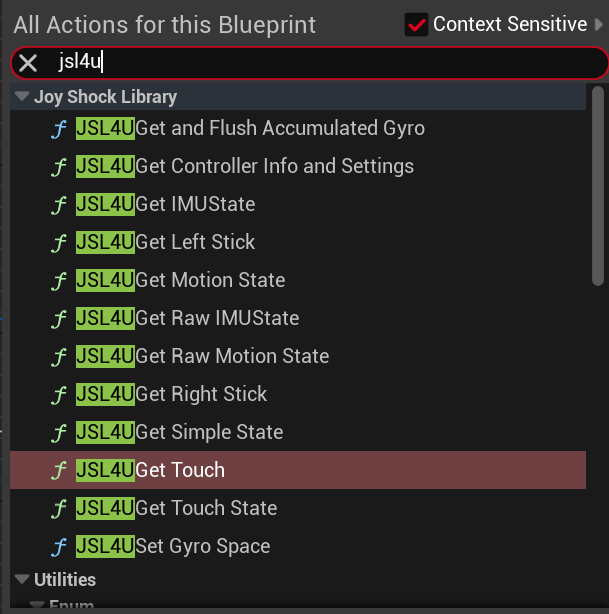
Getting the new input types like gyro and touchpad working wasn’t all I had to do, though. Supporting traditional buttons, triggers and analog sticks also came with its own set of challenges because, as I said, JSL was created in an engine-agnostic way. As a result, the input data for the buttons was returned as a single integer, and then you had to use these bit-masks to check for specific inputs:
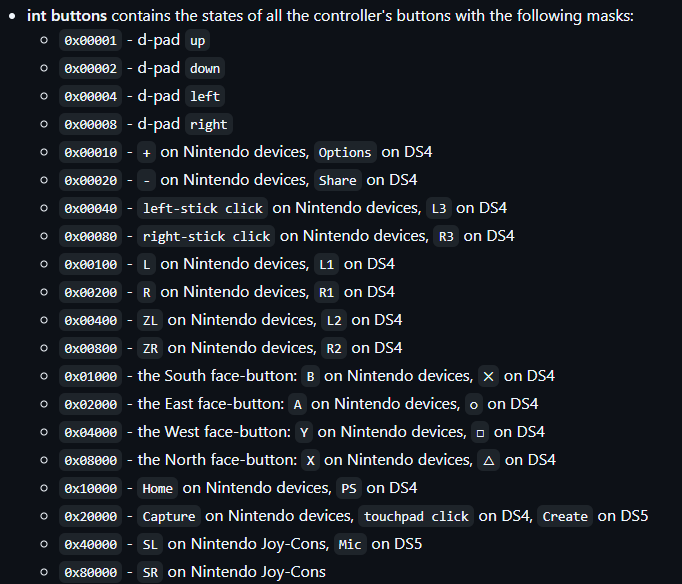
As I was mostly focused on getting gyro working at first, the earlier versions of JSL4U that I uploaded to GitHub still relied on manually checking the buttons integers with these bit-masks, but I knew that if I wanted this plugin to be a success, it needed to be integrated into Unreal’s existing input event system, so that someone could simply add this plugin to their project and have it work immediately with their existing code. So I studied how the XInput and SteamController module/classes worked, and made some important changes:
- My module class
FJoyShockLibrary4UnrealModule) needed to implementIInputDeviceModuleinstead of justIModuleInterface. This was crucial for the input events to be recognized, as Unreal applications (whether it’s a WindowsApplication, LinuxApplication or even AndroidApplication) callGetModularFeatureImplementations<IInputDeviceModule>()to get a list of all the input plugins so that they can handle their messages. - In addition to the module being based on IModuleInterface, I also needed to create a new class based on IInputDevice, which is returned by the module in its virtual
CreateInputDevicefunction. Since XInput called their class XInputInterface, I called mine JoyShockInterface.
That JoyShockInterface class became the heart of this input integration. And the most important InputDevice function that it had to implement was SendControllerEvents(), which is supposed to notify the engine of any changed input values. While the original JoyShockLibrary comes with its own callback functions for connecting, disconnecting, and polling, which I still use, in order to ensure that the input events happen in the right order inside Unreal’s FEngineLoop::Tick function, I had to cache the changed button inputs when JSL triggers its OnPollCallback, so that they can be used later in SendControllerEvents. Since JSL and Unreal run on separate threads, when caching inputs from the former to the latter you have to be careful not miss any button presses and releases that happened between Unreal Ticks. So the cached button state shouldn’t reflect the most recent state, but the most different state when compared to the previous Tick. Allow me to explain with the illustration below (for the sake of simplicity I’m only showing the four face buttons in the bitwise input cache).
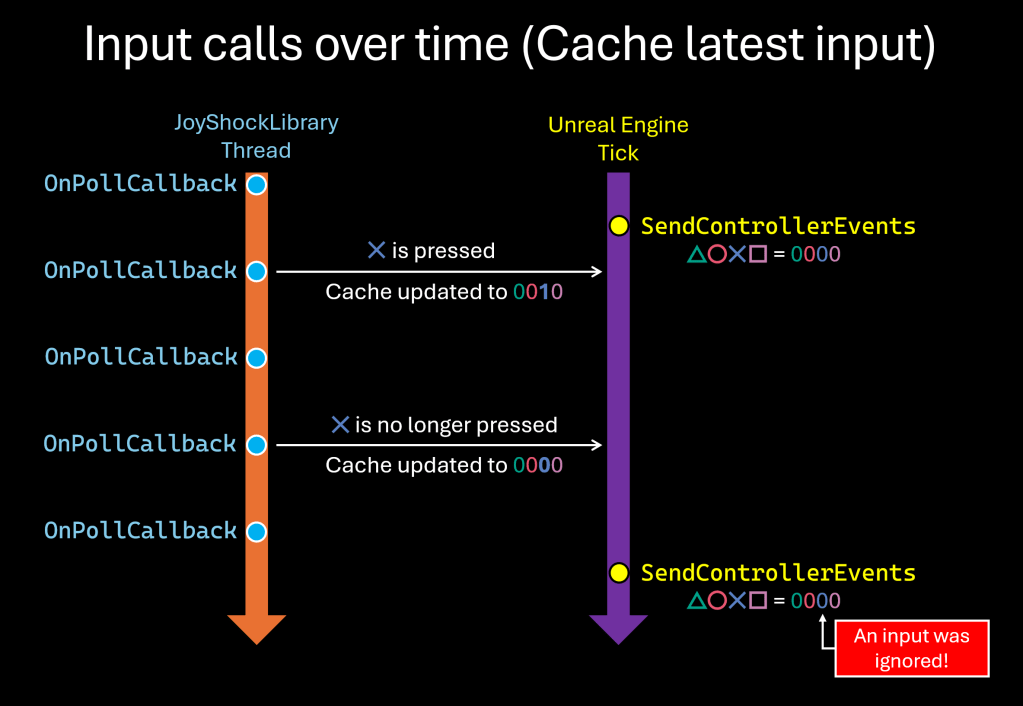
Now here’s what happens when you favor different inputs instead:
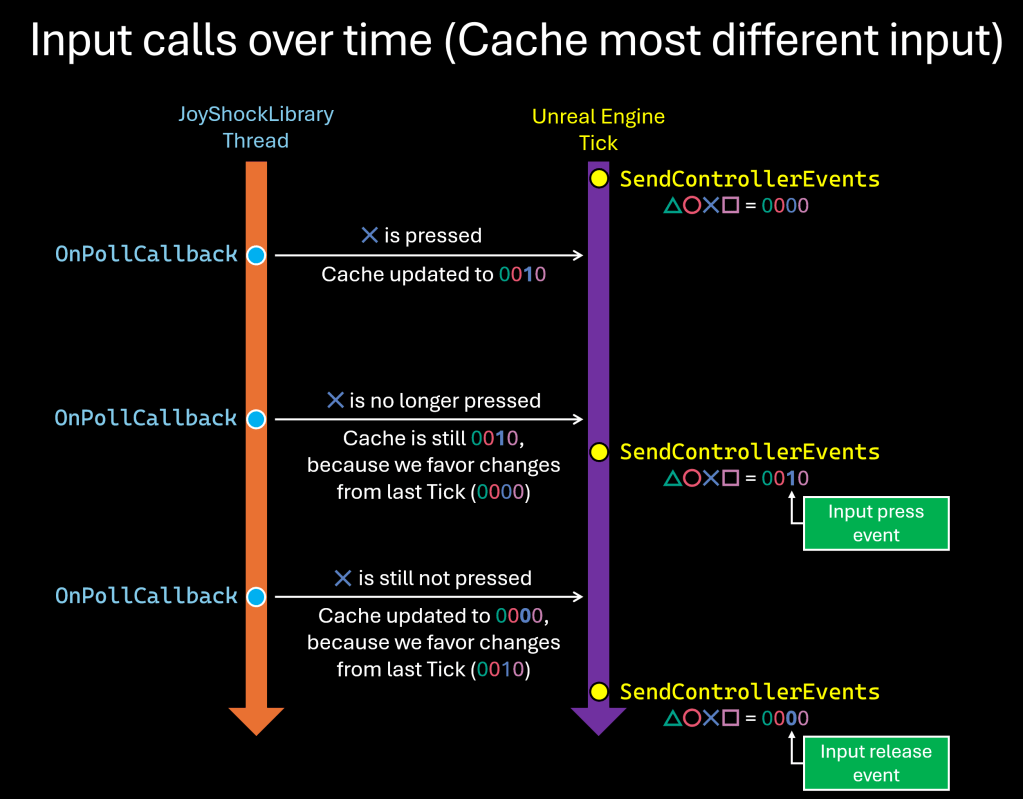
Now you could point out that this solution isn’t perfect, either, because if you had two or more button presses between engine Ticks, only one of them would be reported to the engine, and that maybe I should use a queue of input events instead. And while that observation is not wrong, given that the existing XInputInterface class also only checks for button changes in its SendControllerEvents function, this solution is already at least as good as XInput, which is used by every Unreal game on PC, so those edge cases are probably not that important.
For a future update, I’ve already started working on a Setting for notifying the input changes immediately from OnPollCallback without caching them, which could result in even faster response times internally (where you could theoretically have multiple press and release events for the same button between Ticks), but due to its experimental nature I think it should be used with caution.
When it comes to sending the Button press/release messages to Unreal, we still need to go through each bit of the buttons integer to see what’s changed. For that, I created a ProcessButtons() function that takes the current and previous integer button states (as well as info on which device/user this is for). With bitwise operations you can quickly determine the pressed buttons from the released buttons, like this:
int32 PressedButtons  = ~PreviousButtons & CurrentButtons; // Wasn't pressed, now is.
int32 ReleasedButtons = PreviousButtons & ~CurrentButtons; // Was pressed, now isn't.
JoyShockLibrary already had button masks neatly defined with names such as JSMASK_L and JSMASH_OPTIONS, so I put them in an Array along with the matching Key names used by Unreal (as in the screenshot below). I could’ve used a TMap, but in a case like this where I want to iterate through every entry instead of searching by key, an array is more optimized for the task.
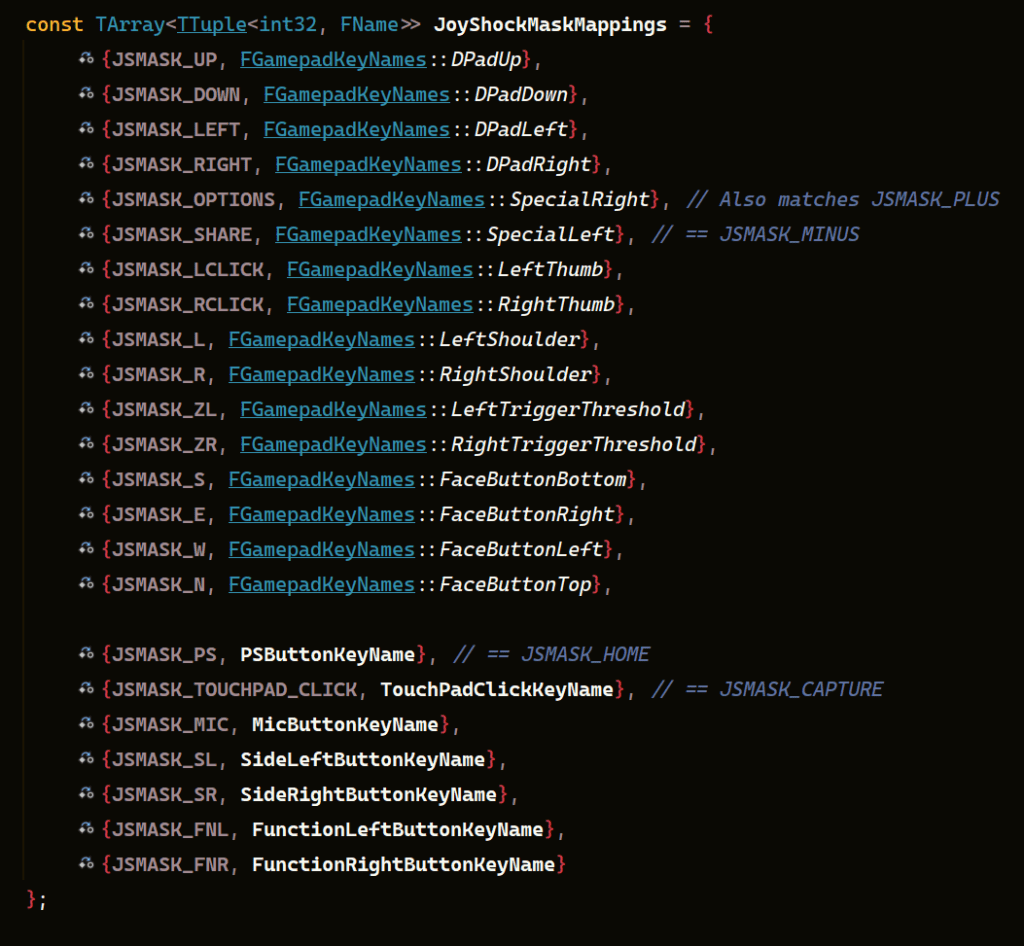
With the masks now mapped to Unreal keys, we can iterate through all mappings, check the PressedButtons and RelesedButtons integers for them, and send the corresponding events through a MessageHandler:
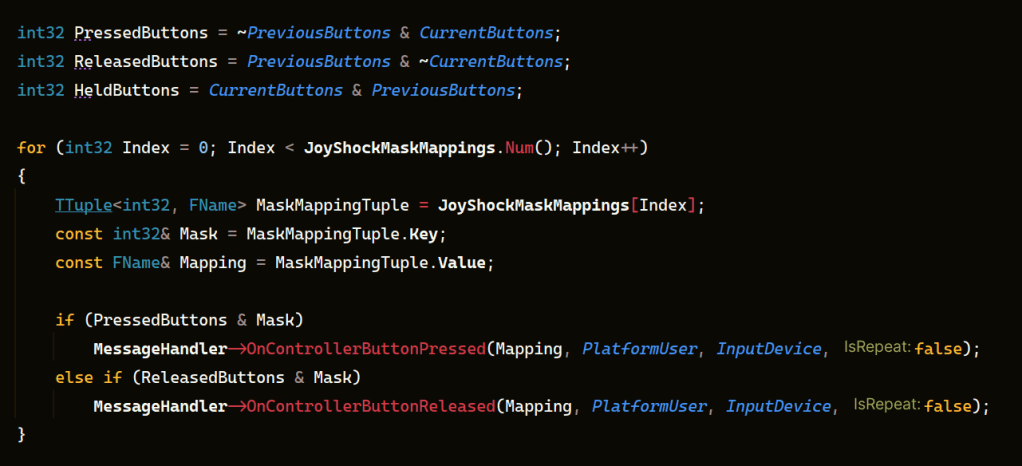
And this covers the core of how the button events work in JoyShockLibrary4Unreal. There are many things I haven’t covered in this post: How input devices are added and removed, the WM_DEVICECHANGE windows message that I had to listen to, the analog stick events, the touchpad events. If you’d like to take a look at how I did them, and maybe even contribute to the project, you can check out the full source on GitHub.
The GitHub page also includes all the basic you needs to add the plugin to your project, tips for using the Demo level, which functions to use to get easy gyro aiming or the curent gyro orientation as a quaternion.
I am still working on adding more features to this plug-in, as well as fixing a few bugs. One feature in particular that I’m pretty excited to support is the DualSense’s adaptive triggers, which other developers have already reverse-engineered and documented. Improved multiplayer support is also at the top of my list.
With that said, I’m already very happy with JSL4U in its current state, and thanks to it I feel empowered to continue working on my own game projects and give them better controls. There’s one idea for a game mechanic that I’ve had for a long time that would benefit tremendously from gyro, so I’m really looking forward to implementing it and showing it to you all! So look forward to more updates in 2025! 😀
Everyone likes to wish for things with a new year coming, and one of my wishes is that one day we get gyro functionality in Xbox controllers as well, as that would help speed up the adoption and standardization of native gyro inputs in game engines. Until then, hopefully this plug-in will help make things easier for all my fellow game developers!
 Agent Ottsel's Game Dev Shenanigans